Multi-platform · macOS + Windows
Airmark
A watermark on your screen. Your work stays in motion.
One product. Two desktops.
Watermark your screen. Keep working.
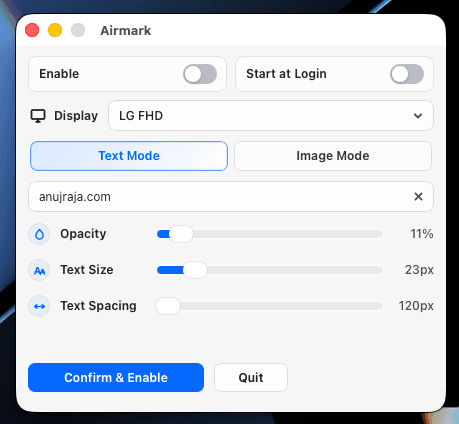
Text and image watermarks for Mac and Windows. Choose your display, adjust the appearance, and keep a visible label over your everyday work.
- macOS
- Windows
- Local desktop app
Windows x64 preview · unsigned installer.
Choose a screenshot
The project in plain English
Why it matters
For Presenters, creators, and people sharing a screen
The problem
A presentation or working display may need a persistent label while the underlying apps remain usable.
My contribution
Built a macOS menu-bar utility and a native Windows tray app, with text or image overlays, display selection, and local settings.
The value
Demonstrates a focused desktop tool that fits into an existing workflow with little interruption.
- Desktop engineering
- System integration
- Focused UX
Scope & limits. A visible overlay for labelling, not copy prevention. The Windows edition is an unsigned preview with private source; secure desktops and exclusive fullscreen apps may not show the overlay. Physical input pass-through and mixed-DPI multi-monitor behavior still need manual Windows checks.
The differences that matter
Key facts
| Detail | macOS | Windows |
|---|---|---|
| Platform | macOS 13+ · current DMG is an Apple silicon build | Windows 10 / 11 x64 · self-contained app |
| Desktop controls | Menu bar · dockless utility | System tray · native settings window |
| Core | Rust shell · Tauri 2 · AppKit bridge | C# · .NET 10 · Win32 overlay controller |
| Settings UI | React · TypeScript · Vite | Native WPF controls |
| Displays | One selected display | Primary display, an individual display, or all displays |
| Install | Download the DMG; drag Airmark.app into Applications. | Per-user EXE installer; .NET runtime included and no administrator access required. |
| Stop controls | Enable/disable and Quit from the menu bar. | Tray controls plus Ctrl + Alt + Shift + F10 to disable the watermark. |
| Release | v0.1.0 · public DMG | v0.2.0 · unsigned EXE preview |
| Source & license | Public source · MIT | Private source · MIT. Native overlay behavior still needs the documented physical-input and mixed-DPI checks. |
Shared flow, native desktop architecture
Diagrams
flowchart TB
  Open["Open Airmark"] --> Pick["Pick display"]
  Pick --> Mode{"Watermark mode"}
  Mode --> Text["Text + opacity + size + spacing"]
  Mode --> Image["Drop, choose, or paste image"]
  Text --> Save["Persist settings"]
  Image --> Save
  Save --> Overlay["Transparent overlay on selected display"]
Overlay --> Work["Keyboard, mouse, and menu bar stay usable"]From download to everyday use
Quick start
macOS
macOS 13+. The current downloadable DMG is for Apple silicon.
- Download the DMG and drag Airmark.app into Applications.
- Open Airmark, then use the menu-bar icon to open Settings.
- Choose one display, select text or image mode, and adjust appearance.
- Enable the watermark and keep working; return to the menu bar to disable it or quit.
Windows
Windows 10 / 11 x64. No separate .NET runtime is needed.
- Download and run the Windows setup EXE. It installs for your account without administrator access.
- Open Airmark and choose a display, or select all displays.
- Use Text Mode or Image Mode, adjust appearance, and click Confirm & Enable. Settings hides while the watermark stays on.
- Reopen Settings or toggle the watermark from the tray. Closing Settings keeps the app running; Quit exits it.
- Launch at login is optional. Ctrl + Alt + Shift + F10 disables the watermark and ends any optional agent session.
Source & development
macOS
Rust · Tauri 2 · React · AppKit
npm install
npm run tauri dev
npm run tauri build
The original macOS implementation owns the menu bar, display selection, and AppKit overlay bridge.
Windows
C# · .NET 10 · WPF · Win32
# From the Windows source checkout
./scripts/Start.ps1
./scripts/Build.ps1 -Publish
./scripts/Test-Package.ps1
Windows source access, .NET 10 SDK, and PowerShell 7.2+ are needed for development. The installer contains the runtime. Optional local agent integration uses a current-user named pipe; it is separate from ordinary watermark use and includes no AI model or computer input.